

BS 7671:2018+A2:2022 Appendix 6

Electrical Installation Certificate (EIC) App for Electricians

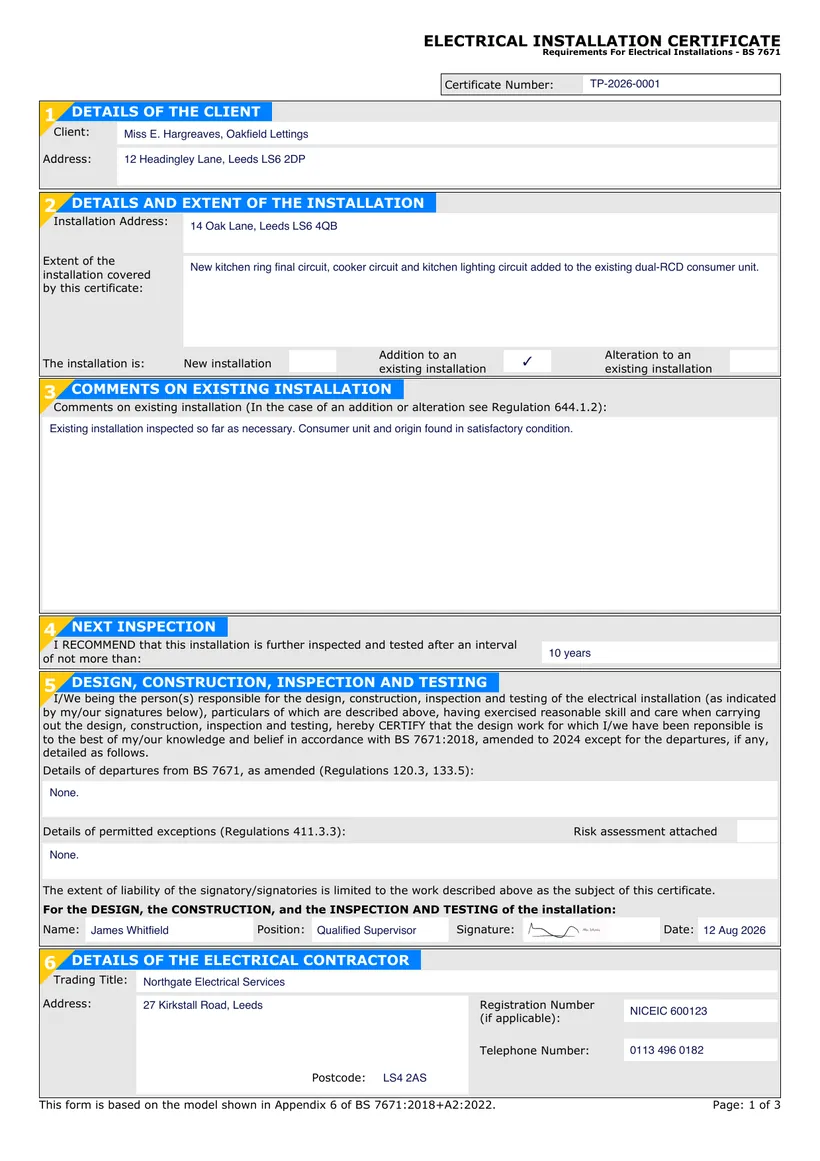
An Electrical Installation Certificate (EIC) is the document that certifies a new electrical installation, or a new circuit added to an existing one, has been designed, constructed, inspected and tested to BS 7671. It follows the model form set out in Appendix 6 of the 18th Edition (BS 7671:2018+A2:2022).

TradePlanr lets you complete the full EIC on your phone or tablet while you are still on site. You capture the installation details, record your schedule of test results, and collect the three declarations for design, construction, and inspection and testing before you leave.

When the job is done you produce a clean, professional PDF that you can email straight to the client and keep for your records, without going back to the office to type anything up.

Issue this certificate from your phone

TradePlanr generates this and 35+ other gas, electrical, oil, plumbing and renewables certificates as proper PDFs — filled on site, signed on screen and stored against the job. Works even with no signal. Free to download.

Download on the App StoreGet it on Google Play

What it covers

  • Client, installation address and details of the installation covered by the certificate
  • Three signatures for design, construction, and inspection and testing (one or more signatories)
  • Extent of the installation and any departures from BS 7671
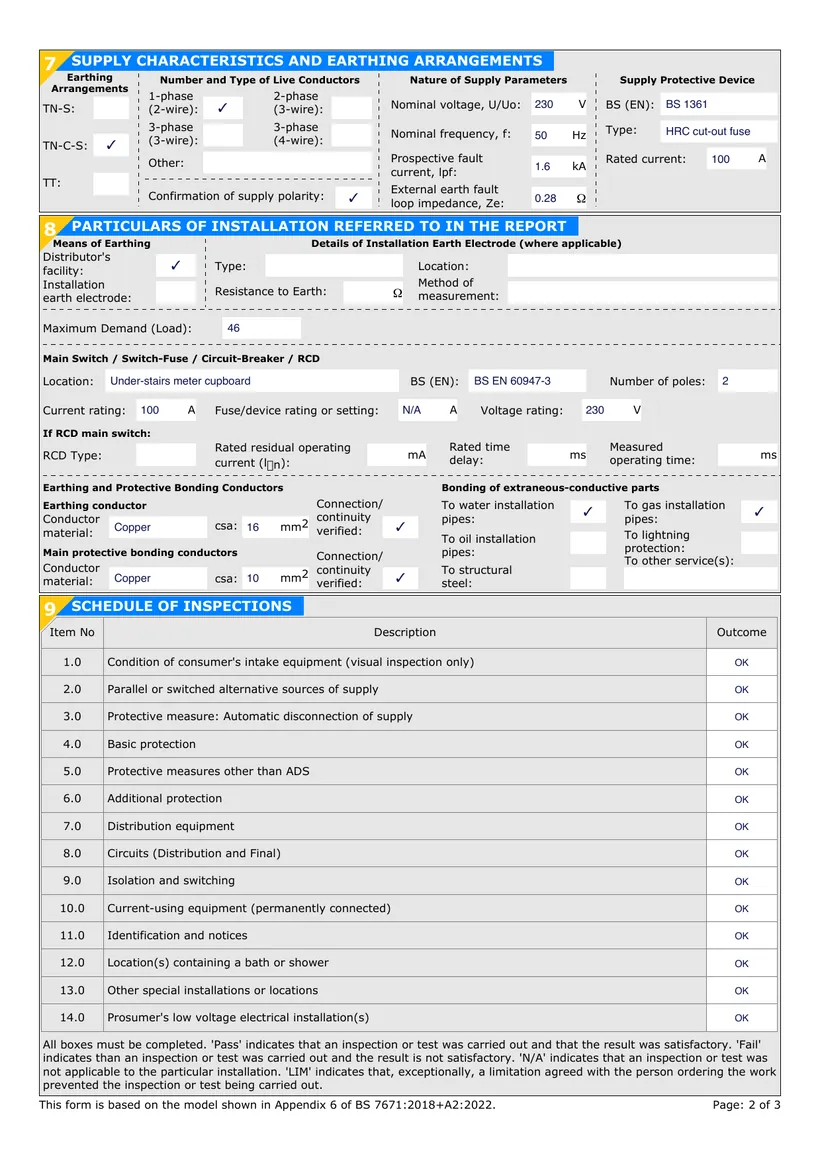
  • Supply characteristics and earthing arrangements
  • Schedule of inspections confirming the installation was inspected
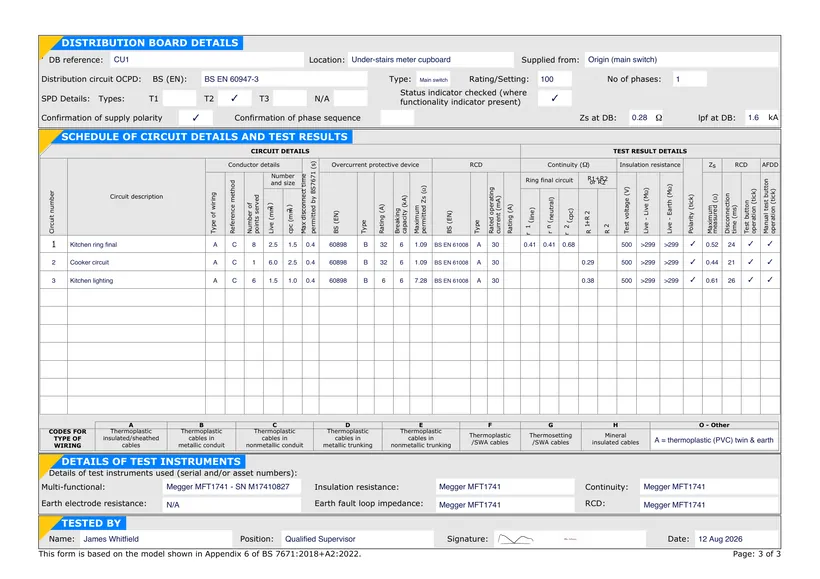
  • Schedule of test results with readings for each circuit
  • Next inspection recommendation and any limitations

When it's required

An EIC is required for all new electrical installations and for the addition of a new circuit to an existing installation. It is the appropriate certificate whenever the work goes beyond a simple alteration.

In England and Wales, certain domestic work is notifiable under Part P of the Building Regulations, and the EIC forms part of demonstrating that the work complies with BS 7671. It should be issued to the person ordering the work.

If the work is only an addition or alteration that does not create a new circuit, a Minor Electrical Installation Works Certificate is used instead. For inspecting an existing installation, you would issue an EICR.

How to issue it in TradePlanr

  1. 1

    Enter the installation and supply details

    Add the client, installation address, the extent of the work, and the supply characteristics and earthing arrangements. Note any departures from BS 7671.

  2. 2

    Complete the schedule of inspections

    Work through the schedule of inspections on your device, confirming each item has been checked as part of the installation.

  3. 3

    Record the schedule of test results

    Enter your test readings circuit by circuit, including continuity, insulation resistance, polarity, earth fault loop impedance and RCD operation.

  4. 4

    Sign and issue the PDF

    Capture the design, construction, and inspection and testing signatures on screen, then generate a branded PDF to email to the client and store.

Frequently asked questions

What is the difference between an EIC and a Minor Works certificate?

An EIC is used for a new installation or a new circuit. A Minor Electrical Installation Works Certificate is used for additions or alterations that do not create a new circuit, such as adding a socket to an existing circuit.

How many signatures does an EIC need?

The BS 7671 model form has three declarations, for design, construction, and inspection and testing. One person can sign all three, or the responsibility can be split between different signatories.

Do I need a schedule of test results with the EIC?

Yes. An EIC must be accompanied by a schedule of inspections and a schedule of test results. TradePlanr builds these into the same document so everything stays together.

Can I fill in an EIC on my phone?

Yes. TradePlanr lets you complete every section of the EIC, sign on screen and issue the PDF from your phone or tablet without returning to the office.

No card required · Free to start · iPhone, Android & web