

PD 6662 / BS EN 50131

Intruder Alarm Commissioning Certificate (PD 6662 / BS EN 50131)

Fill it in on site, sign on screen, and send a professional Intruder Alarm PDF before you leave the job.

Free to build · Send it with a 7-day free trial

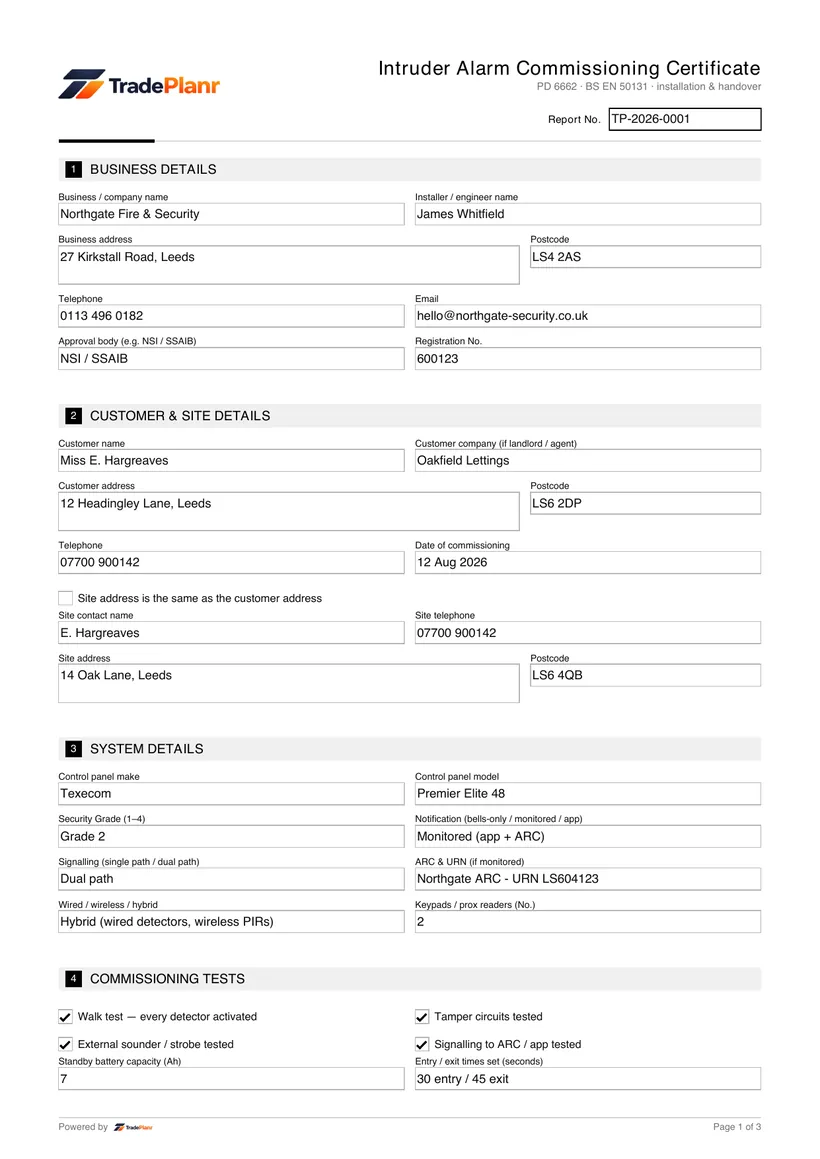
An intruder alarm commissioning certificate records that an alarm system has been installed, configured and tested in line with PD 6662, the UK scheme for applying the BS EN 50131 series. It captures the control panel fitted, the Security Grade the system is installed to, how it signals — bells-only, monitored via an ARC, or app notification — and the tests carried out before handover.

A commissioning certificate is completed whenever a new intruder alarm is handed over, and whenever an existing system is taken over or significantly altered. Insurers commonly ask for one on graded or monitored systems, and where police response is required the alarm receiving centre will expect the installation to be certificated against PD 6662 before a URN is issued.

TradePlanr lets you complete the certificate on your phone or tablet at the property, work through the zone schedule and commissioning tests as you walk the system, capture the customer's signature at handover, and issue a branded PDF on site with a copy stored against the job for your records.

What it covers

  • System details including the control panel make and model and the Security Grade (1 to 4)
  • The notification option — bells-only, monitored or app — and the signalling path used
  • The alarm receiving centre (ARC) and URN where the system is monitored for police response
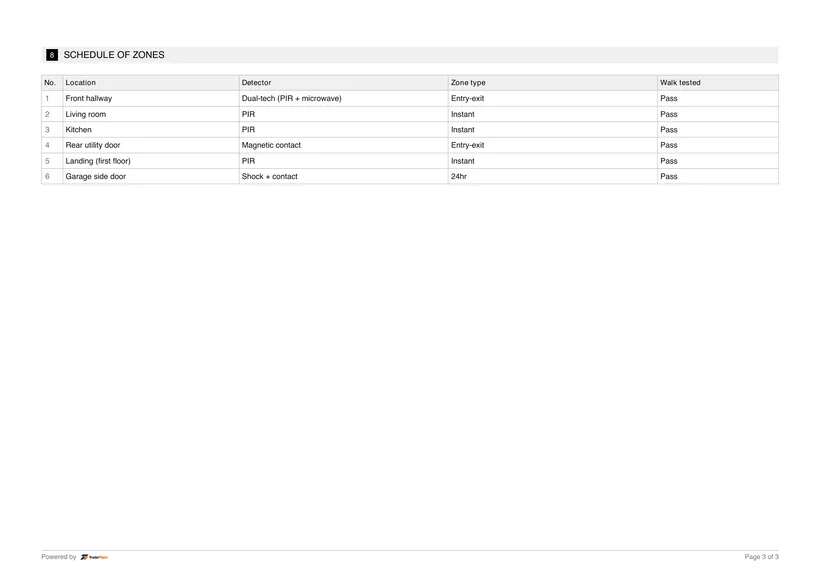
  • A zone schedule covering up to six zones, with location, detector type, zone type and walk-test result for each
  • Commissioning tests including walk test, tamper, sounder, ARC communications and battery standby
  • Entry and exit times as programmed at handover
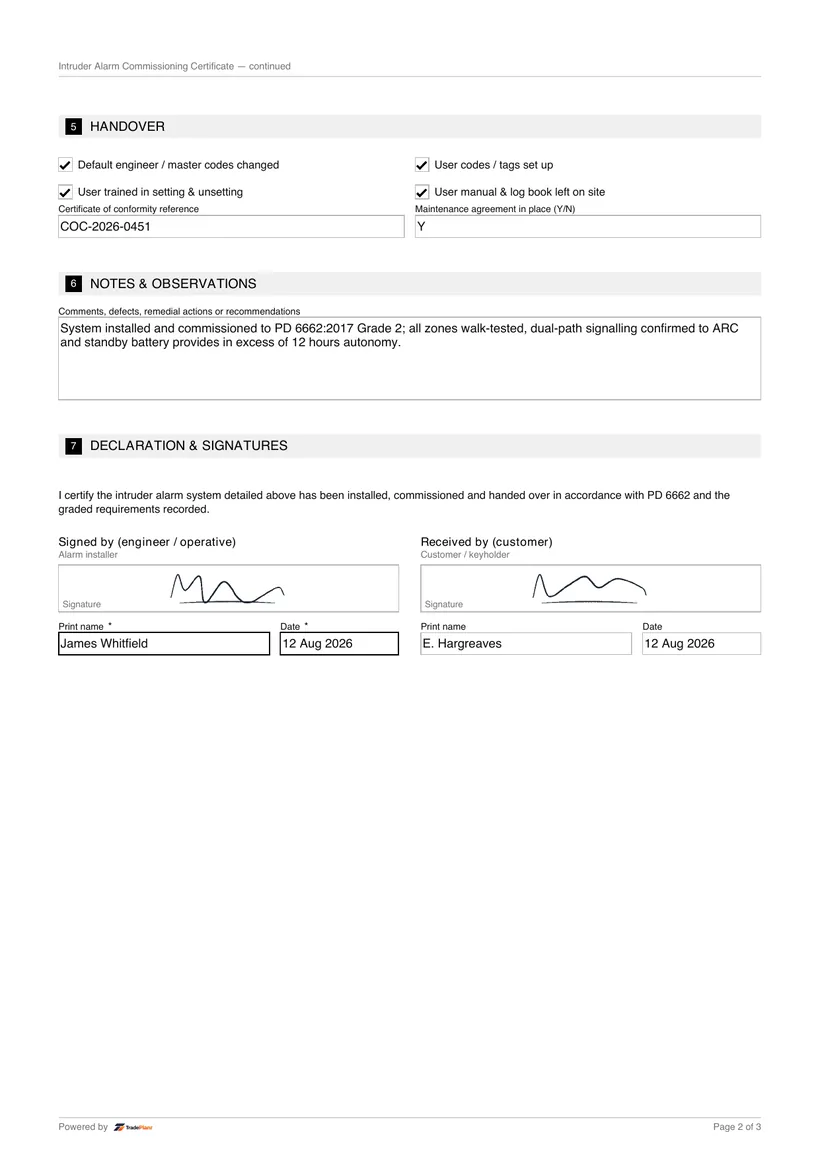
  • Confirmation that default engineer and user codes have been changed and user codes set up
  • Handover details including user training, the certificate of conformity reference and any maintenance agreement

When it's required

Insurers commonly require a commissioning certificate from an installer accredited with NSI or SSAIB when they specify a graded or monitored intruder alarm as a condition of cover. The certificate evidences the Security Grade and signalling option the system was installed to.

Where the customer wants police response, the alarm must be monitored by an ARC and the installation must be certificated as compliant before a URN is issued, so the commissioning certificate forms part of that process.

Issuing a certificate on every handover is good practice even on bells-only domestic systems. It records what was fitted, how it was tested and that the customer was trained, which protects you if the system is later questioned.

How to issue it in TradePlanr

  1. 1

    Enter the system details

    Record the control panel make and model, the Security Grade, the notification option and signalling path, and the ARC and URN where the system is monitored.

  2. 2

    Complete the zone schedule

    Log each zone's location, detector type and zone type as you walk the system, and mark each one as walk tested so the schedule shows full coverage.

  3. 3

    Record the commissioning tests

    Work through the walk test, tamper, sounder, ARC communications and battery standby checks, and record the entry and exit times programmed at handover.

  4. 4

    Confirm codes and training

    Tick off that default codes have been changed and user codes set up, record the user training given, and note the certificate of conformity reference and any maintenance agreement.

  5. 5

    Sign and issue the PDF on site

    Capture the customer's signature, add your declaration and generate a branded PDF certificate before you leave, with a copy stored against the job.

Issue this certificate from your phone or the web

TradePlanr generates this and 45+ other gas, electrical, oil, plumbing and renewables certificates as proper PDFs — filled on site, signed on screen and stored against the job. Works even with no signal. Free to start.

Frequently asked questions

What does the Security Grade of an intruder alarm mean?

BS EN 50131 grades systems from 1 to 4 based on the level of intruder the system is designed to resist. Grade 2 is typical for domestic and low-risk commercial premises, while Grade 3 is common where insurers specify a higher-risk system. The grade drives the detection, tamper and signalling requirements, so it is recorded on the certificate.

What is the difference between bells-only and monitored?

A bells-only system sounds a local sounder when activated and relies on someone nearby responding. A monitored system also signals to an alarm receiving centre, which can notify keyholders or, where a URN is held, request police response. Many systems now add app notification alongside either option, and the certificate records which is in place.

Is NSI or SSAIB membership legally required to install alarms?

No — there is no legal requirement to belong to an inspectorate to install intruder alarms. However, insurers commonly insist on an NSI or SSAIB installer for graded or monitored systems, and police forces will only issue a URN for police response where the installation is certificated through an approved company, so membership matters in practice.

Why must default codes be changed at handover?

Default engineer and user codes are published in manufacturer manuals, so leaving them in place means anyone could disarm or reprogram the system. Changing them at commissioning, and recording that on the certificate, closes an obvious weakness and evidences that the system was handed over securely.

Can I issue the certificate on site?

Yes. TradePlanr lets you complete the zone schedule and commissioning tests as you go, capture the customer's signature and generate a branded PDF certificate on your phone or tablet before you leave the property.

Start Now — It's Free

Free to start · No card · No download needed — works in your browser

Download on the App StoreGet it on Google Play