

What is an OFTEC CD/11?
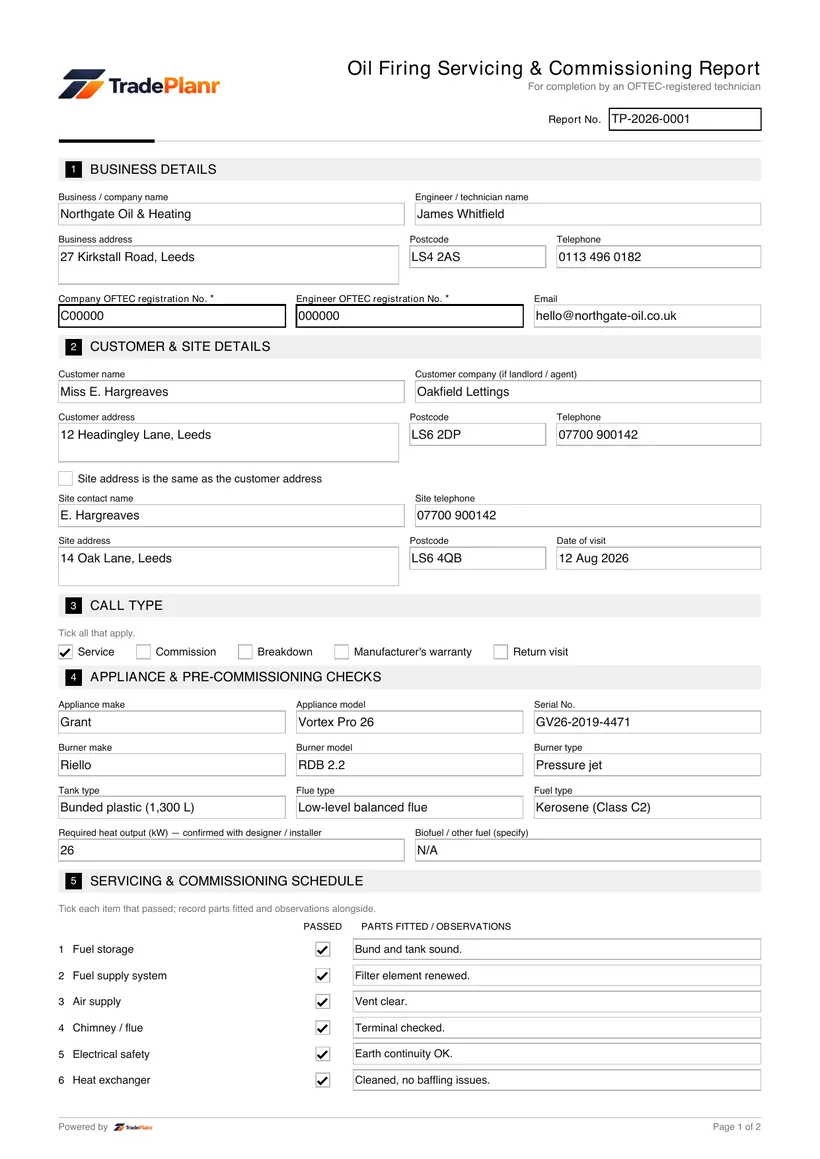
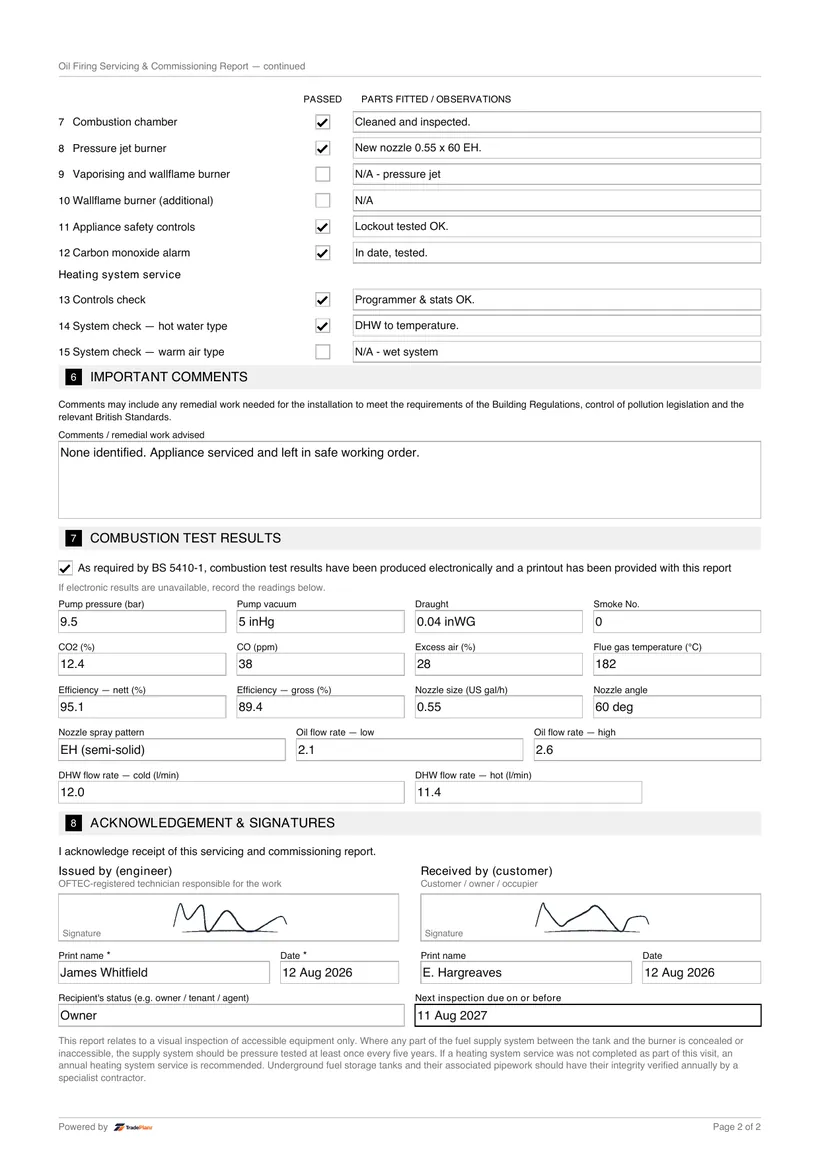
The OFTEC CD/11 is the Oil Servicing and Commissioning Report. It records the combustion readings, nozzle and pressure settings and efficiency of an oil-fired appliance during a service or commissioning visit.
Fill it in on site, sign on screen, and send a professional CD/11 PDF before you leave the job.
Free to build · Send it with a 7-day free trial
Need a CD/11 for your own property? It's issued by the tradesperson who does the work — TradePlanr is the app they use.
The OFTEC CD/11 is the Oil Servicing and Commissioning Report used when you service or commission an oil-fired appliance. It records the combustion readings, nozzle and pressure settings, and the efficiency of the appliance so the customer has clear evidence the work was carried out.
TradePlanr lets you enter your combustion analyser readings and service findings straight into the CD/11 on your phone, then produce a tidy PDF for the customer before you leave site. It removes the double handling of writing on a pad and typing it up later.
Each report is saved against the customer and property, building a service history you can pull up at the next annual visit or when a landlord or homeowner asks for their records.
A CD/11 is completed when you service or commission an oil-fired appliance. Most oil boilers should be serviced annually to keep them running safely and efficiently, and the CD/11 documents the readings and settings for that visit.
The report is also used when commissioning an appliance after installation, capturing the combustion results and settings. It should be handed to the customer and retained as part of the appliance's service record.
Start a CD/11, add the customer and property, then record the appliance make, model, burner type and nozzle details you are working on.
Enter your combustion analyser results, including CO, CO2 and flue gas temperature, so the readings are captured accurately on the report.
Note the nozzle size, pump pressure, burner settings and the servicing tasks completed, along with any remedial work identified.
Capture the customer's signature, then generate a branded PDF that is emailed to the customer and filed against the job automatically.
TradePlanr generates this and 79 other gas, electrical, oil, plumbing and renewables certificates as proper PDFs — filled on site, signed on screen and stored against the job. Works even with no signal. Free to start.
The OFTEC CD/11 is the Oil Servicing and Commissioning Report. It records the combustion readings, nozzle and pressure settings and efficiency of an oil-fired appliance during a service or commissioning visit.
Oil-fired appliances are generally serviced annually, and a CD/11 is completed at each service to document the combustion readings and settings. It is also used when commissioning an appliance after installation.
Yes. With TradePlanr you enter your combustion readings and service findings into the CD/11 on your phone or tablet, then email the customer a PDF before you leave site.
The CD/11 records combustion analysis readings such as CO, CO2 and flue gas temperature, along with nozzle size, pump pressure, burner settings and the resulting efficiency.
The OFTEC CD/10 completion report for a new or replacement oil-fired installation.
The OFTEC CD/12 landlord safety check for oil-fired appliances in rented homes.
The service and maintenance record issued when a gas appliance is serviced.
TradePlanr Agency builds custom-coded, SEO-optimised websites and runs Google Ads for UK trades — from £375, by the team behind TradePlanr.
Explore TradePlanr Agency